
Using WPML to create a multilingual WordPress website with Elementor, Gutenberg, or Divi? Translating these pages isn’t just about converting words from one language to another. The translated content also needs to make sense in the context and be accurate.
This is where AutoMLP – AI Translation for WPML can help.

AutoMLP works alongside WPML and lets you translate supported Elementor, Gutenberg, and Divi content using AI providers such as OpenAI, Gemini AI, Chrome Built-in AI, while preserving the original layout and meaning of the content.
In this guide, we’ll show you how to automatically translate Elementor, Gutenberg, and Divi pages with AutoMLP to create more accurate and context-aware translations using AI.
What Is AutoMLP?
AutoMLP – AI Translation for WPML is an automatic AI translation addon built for WPML.
It works with your existing WPML multilingual setup and lets you generate translations using supported AI translation services:
- OpenAI
- Google Gemini
- Chrome Built-in AI (Pro version)
OpenAI and Gemini require their respective API keys, while Chrome Built-in AI does not require an external API key.
Additionally, if you use the Microsoft Edge browser, AutoMLP also supports Edge Built-in AI, allowing you to generate AI-powered translations without using an external API key.
So, whether you’re translating a landing page, blog post, product page, or another type of page-builder content, AutoMLP helps you move beyond word-for-word translation and create translations at low cost that better preserve the meaning, context, and intent of your original content.
Automatically Translate Elementor, Gutenberg & Divi Pages
Follow the steps below to translate content using WPML AI:
Step 1: Pre-requisite
Before translating your pages, make sure you have the required plugins installed and activated:
- WPML Multilingual CMS
- WPML String Translation
- AutoMLP – AI Translation for WPML
- Your preferred page builder: Elementor, Gutenberg, or Divi
You do not need a different translation process for each page builder. The same basic workflow can be followed for Elementor, Gutenberg, and Divi pages.
Step 2: Page Translation
- Go to WordPress Dashboard > Pages. Use the checkboxes to select one or more pages you wish to translate.
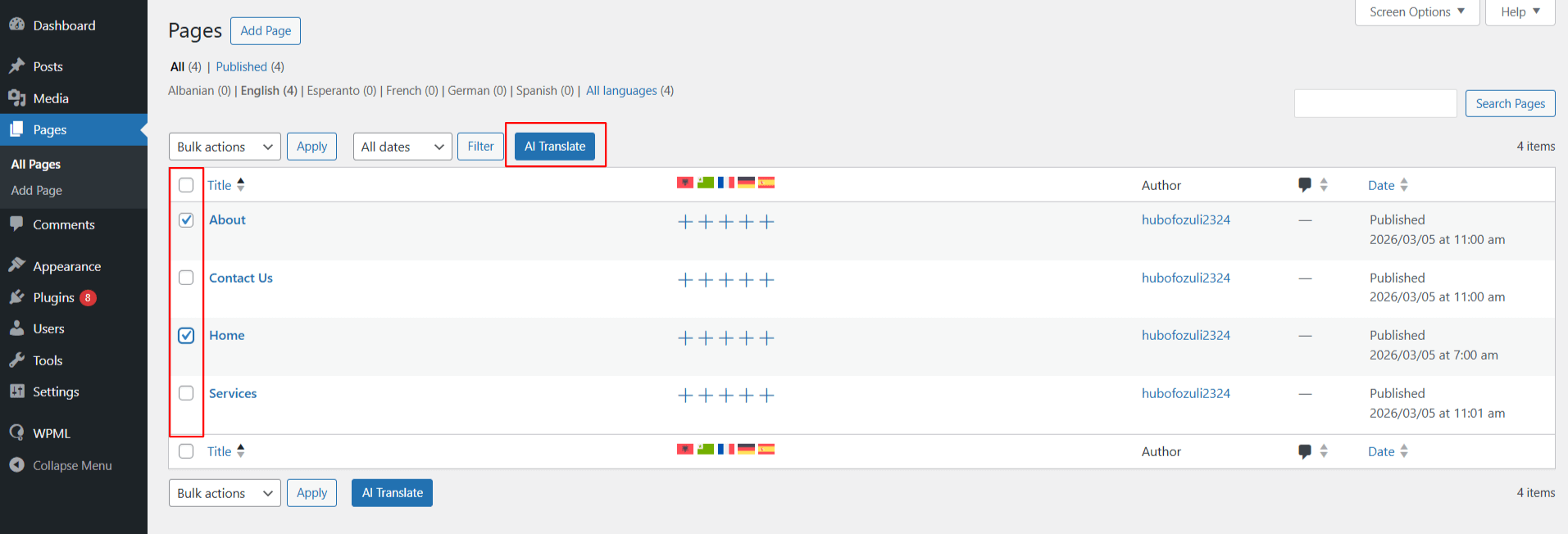
- Once selected, click the AI Translate button at the top.
Step 3: Select the Target Language
- A pop-up will appear, select the language you want to translate your content into.
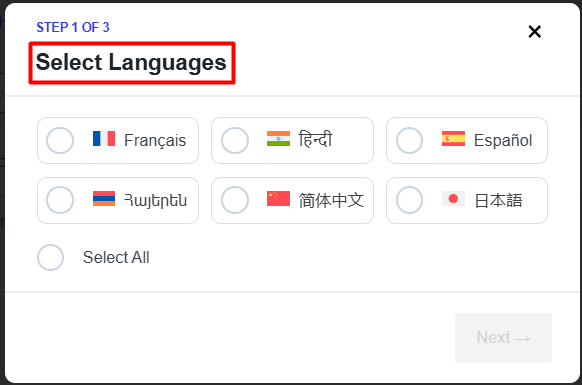
Step 4: Choose Your Translation Provider
- Next, a pop-up will ask you to select the translation provider. Choose the provider you want to use.
- OpenAI
- Gemini AI
- Chrome Built-in AI
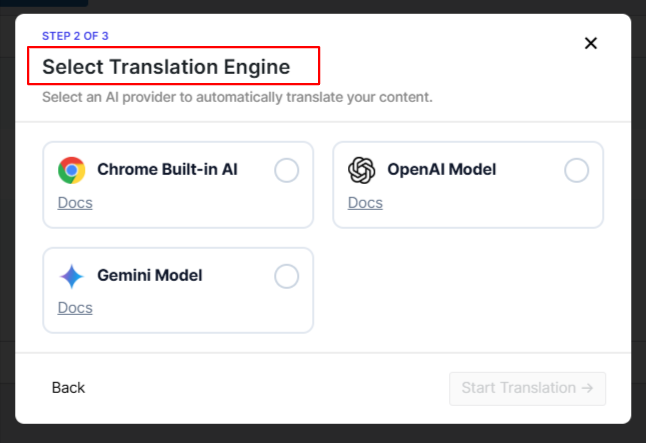
OpenAI and Gemini require an API key. Chrome Built-in AI is available in AutoMLP Pro and does not require an external API key.
Step 5: Start the AI Translation
- Once the provider is selected, start the translation.
- AutoMLP will process the supported page content and generate the translated version.
Step 6: Review the Generated Translation
- After the translation is generated, review the content.
- The translated content will be added to the target-language version of your page.
Conclusion
Translating a page built with Elementor, Gutenberg, or Divi is not just about changing the language. The translated version should still carry the same meaning and be natural to the people reading it.
With AutoMLP, you can use OpenAI, Gemini AI, or Chrome Built-in AI to translate supported page-builder content while WPML continues to manage your multilingual setup.
So, if you already use WPML and want accurate & context-aware translations at low cost, AutoMLP is a practical option and worth trying.