
We can’t really imagine running an online business or collecting payments today without a website anymore. It actually makes sense because things like tracking orders, managing customers, and keeping payment records all in one place just get messy if you’re doing everything manually.
Recently, I came across a product called PaymentForm.io. It’s not a payment gateway, and it’s not trying to replace full eCommerce platforms, either. It is basically built for situations where traditional tools feel too heavy, too technical, or honestly just more than you actually need.
In this blog, I’ll walk you through what PaymentForm.io does and why it might actually be a useful tool for small businesses and solo entrepreneurs who just want a straightforward way to start collecting payments and selling online.
What is PaymentForm.io?
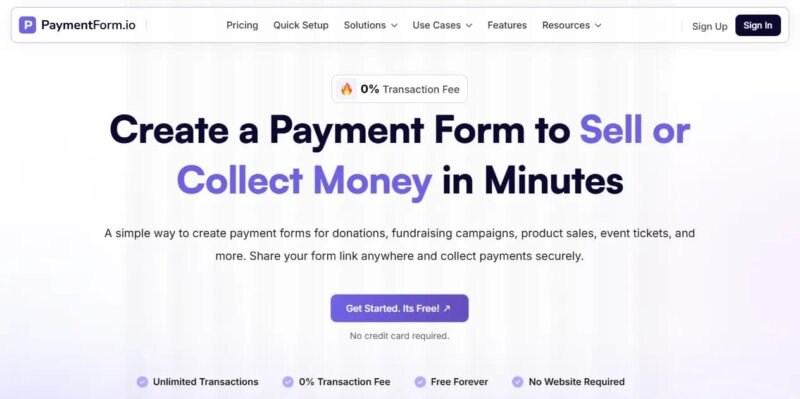
I know you’re probably wondering what this product actually is. PaymentForm.io is basically a simple, no-code, form-based tool that helps you collect payments online without needing a website.
It is designed for people who want a quick and easy way to sell products, collect donations, or accept payments without dealing with technical setup. You can add what you are selling or collecting money for, connect your preferred payment gateway like Stripe or PayPal, and then share a link with your audience.
When someone opens that link, they see a clean checkout page where they can fill in their details and complete the payment instantly. This makes the entire process much simpler because you don’t need to worry about website design, hosting, or complicated store setup. Everything happens through a single form that works like a mini checkout page.
PaymentForm.io is actually built keeping a few specific use cases in mind. It’s not trying to be a one-size-fits-all complex system; it focuses on the most common ways people want to collect money online in a simple way. It works really well for things like:
- Selling physical products like clothes, accessories, or handmade items.
- Collecting donations (one-time or recurring).
- Running fundraising campaigns with clear goals and deadlines.
- Selling digital products such as ebooks, templates, or downloads.
- Selling event tickets and collecting attendee details.
- Managing memberships with recurring payments and automatic renewals
In short, it’s designed around real-world situations where people just need a quick, clean, and easy way to get paid online without building a full website.
How does PaymentForm.io work
PaymentForm.io keeps things very simple. The whole process is designed to take just a few minutes.
1. Choose a module or Use Case: First, you choose a module or use case based on what you want to do, like selling a product, collecting donations, running a fundraiser, or selling event tickets.
2. Customize Your Forms: Next, customize your form. You can add details like what you’re offering, pricing, customer information fields, and a few settings based on your needs.
3. Connect Your Payment Gateway: Link your preferred payment provider, such as Stripe, PayPal, or Razorpay, to start accepting payments securely.
4. Share the link: Once everything is ready, share your form link anywhere, like social media, WhatsApp, email, or QR code, and start receiving payments instantly.
Key Features that make PaymentForm Useful
Let’s take a look at some of the key features of PaymentForm.io. One thing I really loved while exploring this product is how it directly solves the common problems people face when collecting online payments for different use cases.
In the next sections, I’ll go through the main features one by one and explain them in a simple and short way so you can clearly understand how each feature helps solve real-world problems.
Core Selling & Payment Features
- Unlimited transactions – There are no limits on how many transactions you can process in PaymentForm.io. You can receive unlimited payments without worrying about any caps, limits, or restrictions set by the platform.
- Multi-payment gateway support – PaymentForm.io supports multiple payment gateways like Stripe, PayPal, Razorpay, and more, so you can accept payments through the method that works best for your business and customers.
- Multi-currency Support – PaymentForm.io supports multiple currencies, which allows you to set the currency that works best for your business. This makes it easier to sell to customers in different regions while keeping your pricing clear and consistent.
- Tax rules setup – PaymentForm.io lets you create and apply tax rules directly to your forms. So it will be easy to calculate taxes automatically during checkout, and you don’t have to add them manually for every sale.
- Recurring payment support – For donation-based use cases, PaymentForm.io allows contributors to set up recurring contributions. So that organizations and fundraisers receive ongoing support while giving donors the flexibility to manage or pause their recurring payments whenever they want.
Order, Customer & Communication Management
- Automatic Confirmation Emails – Send instant emails after payment. Buyers get receipts and order confirmation, while sellers get order notifications. Fundraisers can also send thank-you emails automatically.
- Field Customization – Customize your forms and collect only the data you need using 10+ field types like name, email, phone, address, and more.
- Invoice Builder – Collect only the data you need using 10+ field types like name, email, phone, address, and more.
- Customer Portal – PaymentForm.io provides customers with a dedicated portal to view their orders, payment history, and details in one place, making it easier to track everything.
- Team Access: Give your staff secure access to view order statuses and payment details, making it easier to respond to customers and manage orders without sharing your login.
Analytics, Tracking & Optimization
- Built-in Analytics – Track form views, conversions, total revenue, and average order value in one place.
- Tracking Manager – Integrate Google Analytics and Meta Pixel to track user behavior and measure campaign performance.
- Abandoned Form Tracking – Identify users who started but didn’t complete payment. It can help you recover lost sales or donations.
Branding, Design & Customization
- Custom Domain – Use your own branded domain instead of a generic link for a more professional checkout experience.
- Coupon Creation – Create and manage discount coupons with control over value, usage limits, minimum purchase, and scheduling.
- Password-Protected Forms –Restrict access to specific forms so only selected users can view or submit them.
- Theme Customization – You can customize your payment forms to match your brand, giving customers a more professional and consistent checkout experience.
- Custom Form Fields –Build forms your way by adding only the fields you need, so you collect exactly the right information without making the form complicated.
Other Features
- QR Code Generator – Every form comes with a QR code, making it easy to share your payment link offline or online. Customers can scan it from flyers, posters, packaging, or event banners and pay instantly
- Webhooks – With webhooks integration, you can automatically send form data to tools like CRMs, Google Sheets, and email platforms from PaymentForm. This helps you avoid manual work and keeps your systems updated in real time.
- Shipping Fee – You can easily add and manage shipping charges within your forms, ensuring delivery costs are automatically included in the final payment.
Modules of PaymentForm.io
The core modules of PaymentForm.io are built around the most common ways people collect payments online. In the following sections, we’ll explore each module, its key features, and the use cases it’s designed for.
The modules of PaymentForm.io are
- Single Physical Products.
- Multiple Physical Products.
- Donation.
- Fundraising.
- Event Tickets
- Membership
- Digital Product
Selling a Single Physical Product
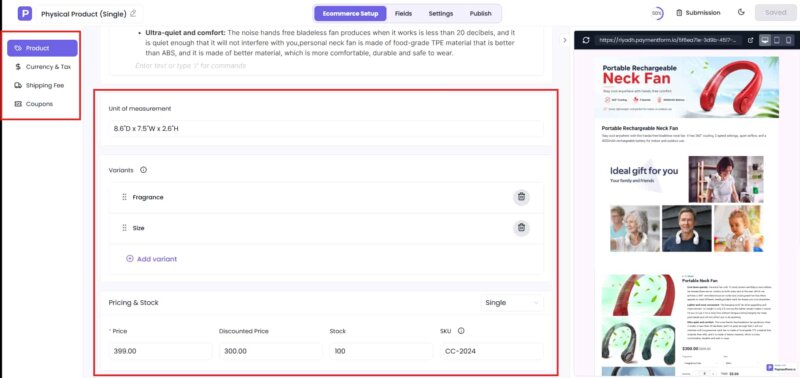
If your business revolves around just one product, you don’t need the complexity or cost of a full online store. PaymentForm.io lets you create a simple payment page where customers can view your product, place an order, and pay online in just a few clicks.
Let’s say a small skincare brand selling its signature face cream on Facebook or Instagram can share one payment link with customers instead of taking orders through messages. The customer completes the purchase online, and the business owner receives the order and payment details in a single dashboard.
Key Features
- Customer information collection during checkout
- Real-time sales tracking
- Centralized order management
- Shipping fee configuration
- Automatic tax calculation
- Discount coupon creation and management
Best for: Small business owners with a single flagship product, handmade and craft sellers, beauty and skincare brands, home-based businesses, and entrepreneurs selling through social media or WhatsApp.
Selling Multiple Physical Products
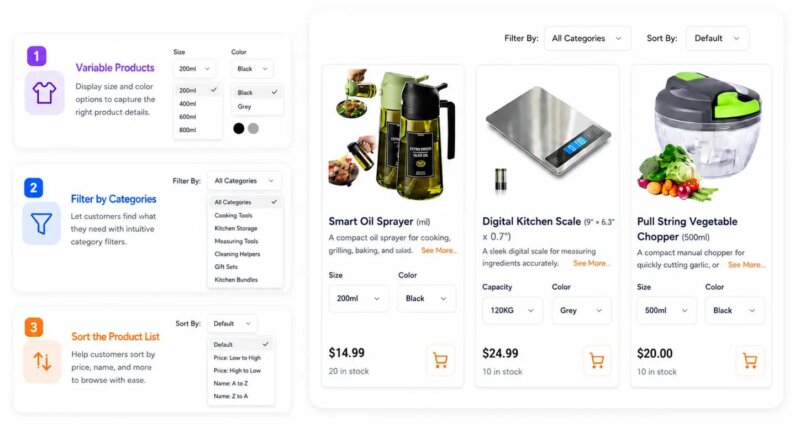
As your business grows, managing several products manually can become difficult. PaymentForm.io gives you a simple way to showcase your entire catalog, accept payments, and organize orders all without building a traditional eCommerce website.
Suppose you sell shoes in different styles, sizes, and colors through Instagram or Facebook. Instead of handling every order in your inbox, you can create a product catalog in PaymentForm.io and share a single checkout link. Customers select their preferred options, place an order, and pay online in a smooth, self-service experience.
Key Features
- Product categories and subcategories for better organization.
- Variants for size, color, quantity, and other options.
- Built-in inventory and stock management.
- Shipping fee and tax configuration.
- Discount coupons and promotional pricing.
- Centralized order management.
- Customer information collection during checkout.
- Real-time sales and order tracking.
Best for: Clothing brands, shoe stores, boutique owners, gift shops, and any business selling multiple physical products online.
Donation Module
The Donation Module in PaymentForm.io helps nonprofits, charities, and community projects collect funds online simply and transparently. You can create a clean donation page, set suggested or custom amounts, and share it across social media, email, or messaging apps.
Suppose a local charity running a relief campaign can share a single donation link on social media. Supporters open the page, see the goal and progress, choose an amount, and donate instantly. All donor details and payments are recorded automatically in one dashboard.
Key Features
- Set fixed donation amounts or allow custom contributions
- Enable recurring donations (daily, weekly, monthly, yearly)
- Collect donor details using custom form fields
- Send automated donation receipts
- Add custom thank-you messages after donation completion
Best for: Nonprofits, charities, fundraising campaigns, community projects, religious organizations, and individuals raising funds for a cause.
Fundraising Module
The Fundraising Module in PaymentForm.io is built to help users run structured, goal-based fundraising campaigns with clear tracking and full transparency. It allows you to create a campaign page, set a funding goal, define a deadline, and start collecting contributions in a simple and organized way.
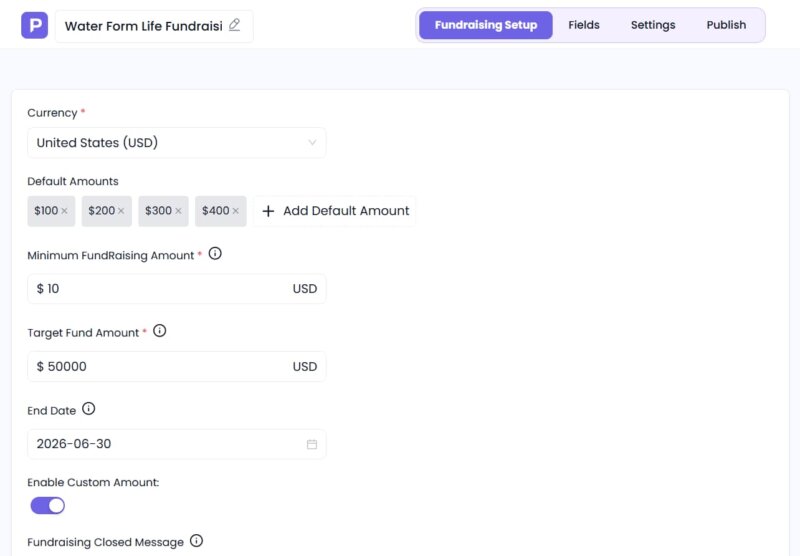
To improve engagement and trust, each campaign can display a live progress bar showing how much has been raised so far compared to the target goal.
Key Features
- Fundraising goal tracking
- Campaign deadline setup
- Automatic campaign closure
- Custom contribution amounts
- Multi-currency support
- Contributor information collection
Best for: Nonprofits, community projects, emergency support campaigns, educational funding, religious organizations, and personal or group fundraising efforts.
Selling Digital Product
If you sell digital products like ebooks, templates, software, online courses, or downloadable files, PaymentForm.io makes the process really simple.
Whether you’re offering a single product or multiple digital items, the platform lets customers browse, pay, and complete their purchase through a clean checkout experience.
Key Features
- Sell one or multiple digital products from a single checkout form
- Showcase products with images and descriptions
- Include file formats, license details, or access information
- Collect customer details before payment
- Send automatic order confirmation emails
- Track purchases and manage orders from one dashboard
Best For: Ebook and guide creators, template and design sellers, software developers, course creators and educators, and anyone selling digital downloads
Event Tickets
The Event Tickets Module will help organizers manage event registration and ticket sales in one place. It allows you to create events, set ticket types, collect attendee details, and accept payments online with ease.
An organizer can create ticket types, share an event link, and let attendees register and pay instantly while all data is managed automatically.
Key Features
- Create and manage events in minutes
- Offer multiple ticket types with different prices
- Collect attendee information during registration
- Accept online payments through supported payment gateways
- Send automatic registration and payment confirmation emails
- Track ticket sales and registrations from a centralized dashboard
- Share events easily using a direct link or QR code
Best for: Event organizers, workshop hosts, seminar planners, and community events. Training programs, Community events, Conferences, and meetups.
Membership
The Membership Module will support recurring subscription-based payments for membership programs. Users will be able to create plans, collect member details, and manage renewals automatically in one system.
Instead of handling memberships manually, everything from sign-ups to renewals will be automated, making subscription management simple and scalable.
Key Features
- Create multiple membership plans with custom pricing
- Support recurring subscription payments
- Manage member records from a single dashboard
- Send confirmation emails
- Track subscriptions and payment history
Best for: Clubs, associations, coaching programs, communities, and any business running a subscription model.
Compare PaymentForm.io with other alternatives
Let’s understand, through the comparison, how PaymentForm.io differentiates itself from other alternatives.
| Product Name | Primary Use Case | Fee Model | Best for | Pricing |
| PaymentForm.io | Form-based checkout for single and multiple products, donations, fundraising, tickets & memberships | 0% transaction fee | Businesses need one tool for all payment use cases. (small businesses, donation, fundraising) | Starts from 5$ per month |
| Payhip | Digital product selling | 5% transaction fee | Digital creators | Starts from $29 per month |
| Gumroad | Digital creator storefront | 10% + $0.50 for direct/profile sales, and 30% for sales through Gumroad Discover. | Simple digital sales | Transaction fee-based. |
| GoGetFunding | Crowdfunding campaigns | 4% platform fee on funds raised | Fundraising campaigns. | Transaction fee-based. |
| Donorbox | Nonprofit donation tools | Standard plan platform fees start at 2.95% and can go up to 3.95% | Nonprofits. | Transaction fee-based. |
| Givebutter | Fundraising & events platform | 3% platform fee if optional tips are disabled. 0% platform fee if tips are enabled | Fundraising events, clubs, community groups, etc. | Starts from $33.80 per month. |
From the comparison, it’s clear that most alternatives are built for a specific purpose, such as selling digital products or managing fundraising campaigns, and many charge platform or transaction fees on every sale or donation.
PaymentForm.io takes a different approach by offering an all-in-one, form-based checkout solution for businesses, nonprofits, and creators, all with 0% platform transaction fees and the most affordable option in the list, starting at just $5 per month.
So, if you’re looking for a flexible tool that supports multiple payment use cases without the complexity or high costs of specialized platforms, PaymentForm.io can be your right choice.
Final Thoughts
After exploring PaymentForm.io, I think its biggest strength is that it doesn’t try to be everything for everyone. Instead, it focuses on making online payment collection simple for people who don’t want the overhead of building and managing a full website.
So If you are running a small business, selling through social media, collecting donations, or launching a fundraising campaign, the platform offers a practical way to get started quickly. The form-based approach is easy to understand, and the growing list of modules makes it flexible enough for a variety of use cases.
That said, if you need a feature-rich eCommerce platform with advanced storefront customization or enterprise-level functionality, a traditional online store builder may still be a better fit.
Overall, PaymentForm.io fills an interesting gap in the market. It’s a straightforward solution for individuals and organizations that want to collect payments online without unnecessary complexity, making it a tool that’s worth considering for its intended audience.