Elementor Forms makes it easy to create contact forms, lead generation forms, registration forms, and more. Its drag-and-drop Form Widget makes the entire form-building process easy and manageable.
However, Elementor has some limitations. The Form Widget provides only the basic form fields like Text, Email, and Telephone, etc. While these fields work well for simple forms, many websites need additional fields to collect more accurate and user-friendly information.
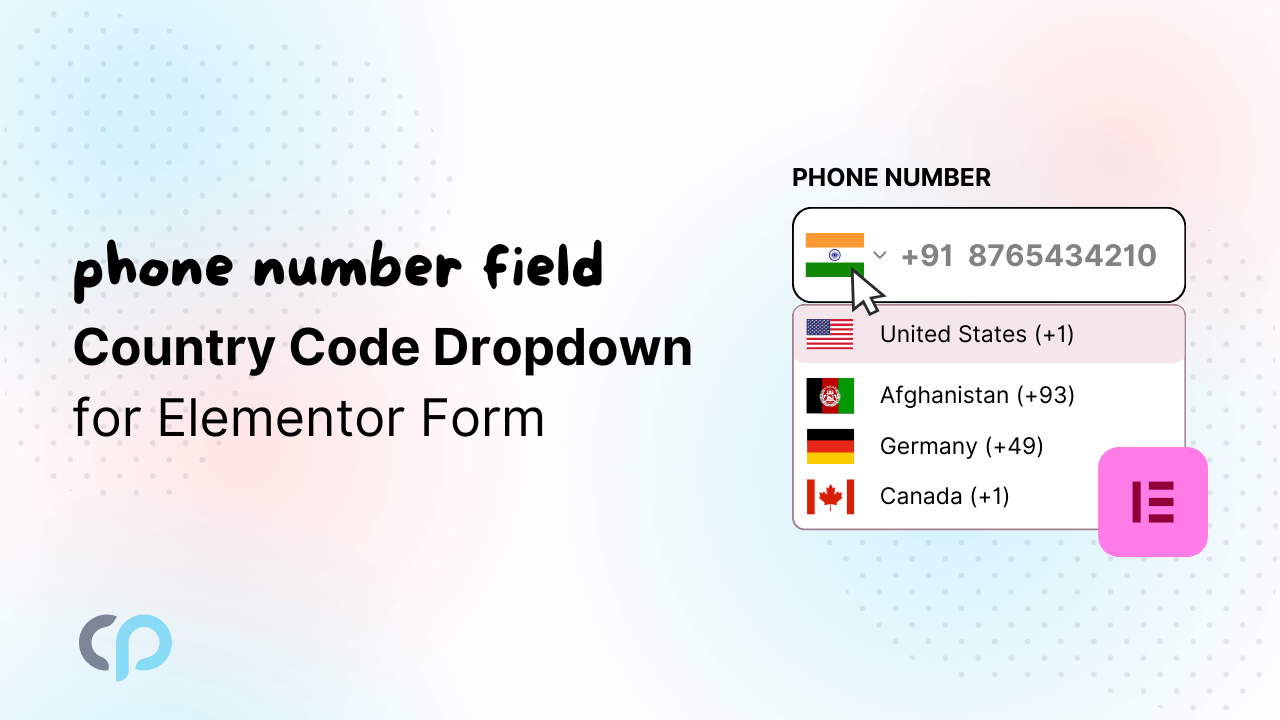
One such feature is a Country Code for Elementor form’s phone number field.
Even though, Elementor Form includes a Tel field that allows you to collect phone numbers from users.
But this field does not include a country code selector. It works like a simple phone number input box where users have to type their number manually.
Along with a phone number, users can even enter alphabets, symbols, or extra characters, which makes the submitted phone number data inconsistent and incorrect.
To solve these issues adding a Country Code dropdown to the Tel field of Elementor Forms becomes important. It allows users to select their country code and then enter their phone number in a clearer format.
Since Elementor does not provide this option by default, you need an additional plugin to enable it.
Cool FormKit is an advanced addon that extends the Elementor Forms with 25+ form fields, including country code.
In this guide, you will learn how to add a Country Code dropdown to the Tel field of Elementor Forms step by step using Cool FormKit.
What is a Country Code?
A Country Code is a unique number added before a phone number to identify the user’s country. For example, +1 is used for the United States, +91 for India, and +971 for the United Arab Emirates. Depending on the country, these codes can be one to three digits long.
The country code is important because the phone number format can be similar across different countries. Adding the correct code helps businesses identify a customer’s location and communicate with them successfully.
For example, a user from Germany submits a form with the phone number 15123456789 without including the +49 country code. It becomes difficult to determine the user’s country, which leads to failed calls, undelivered SMS messages, and missed follow-ups with users.
Adding a Country Code field may seem like a small change, but it ensures that phone numbers are complete, accurate, and ready for international communication.
Step-by-Step Guide To Add Country Code Dropdown in Elementor Form
Follow the steps below to add a country code to Elementor form’s “Tel field” using Cool FormKit:
- Before getting started, make sure that the following plugins are installed and activated on your WordPress website:
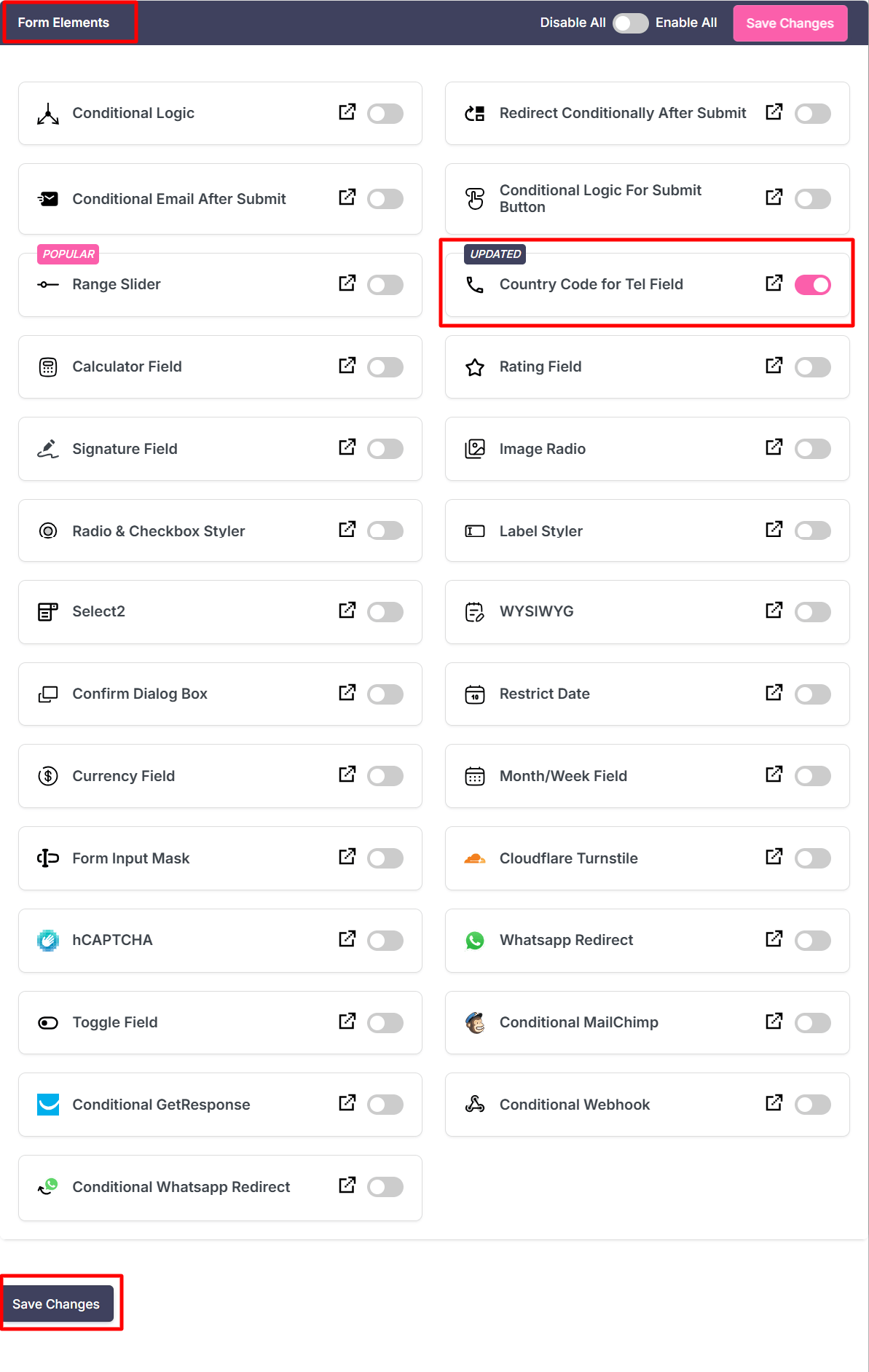
- Firstly, make sure you have turned on the “Country Code for Tel Field” feature in the WordPress Admin Panel >> Elementor >> Cool FormKit >> Form Elements Tab.
- Edit your Elementor form and click on the Phone Number field. In the Content settings, go to the Type dropdown and select “Tel”.
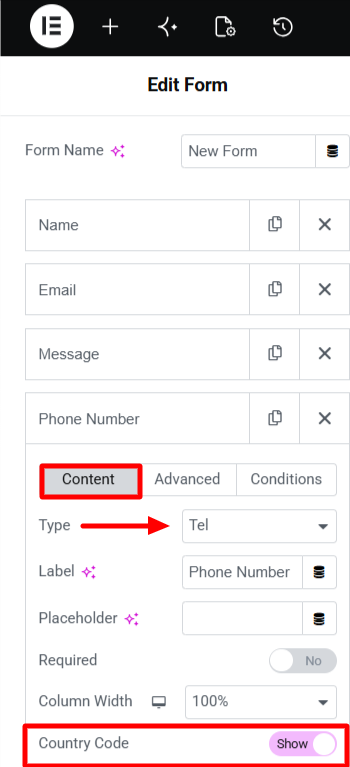
- Once the field type is set to Tel, toggle the “Country Code” switch to ON. This will add a dropdown.
- After turning on the “Country Code” switch, you will get access to the list of customization options to optimize the country code dropdown as per your needs:
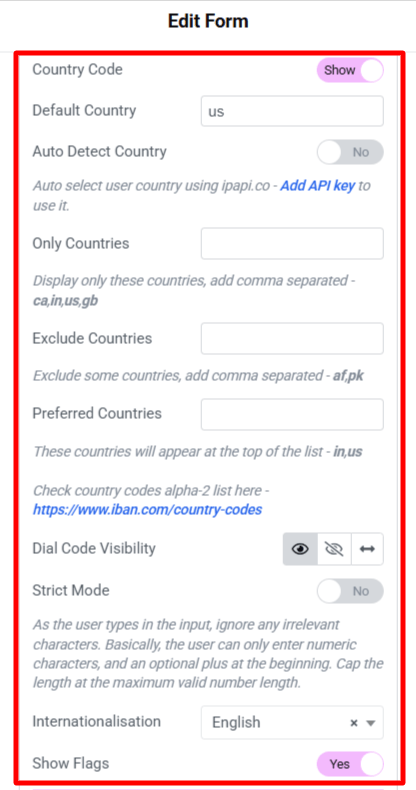
- Default Country:- Set the default country to define which country should appear pre-selected in the country code or country dropdown when the form is first loaded.
- Only Countries:- Mention the list of countries that you want to include in the dropdown list. All other countries will be hidden.
- Exclude Countries:- Mention the list of countries that you don’t want to appear in the dropdown.
- Preferred Countries:- Set the order in which the countries must appear in the dropdown. The countries mentioned here will appear at the top of the list.
- Dial Code Visibility:- Control the visibility of the dialing code. It provides you with three display options:
- Show: Displays the country dial code together with the phone number field. Example: +91 9876543210
- Hide: Hides the country code while displaying the phone number field. Example: 9876543210
- Separate: Displays the country dial code in a separate section from the phone number.
- Strict Mode: Enable the strict mode to ensure that users can enter only a valid phone number format in the phone field. This feature restricts the inputs to numeric digits and automatically ignores invalid characters.
- Internationalisation: This option lets you choose the language used for the country dropdown list in the phone field.
- Show Flags: Enable this option to display each country’s flag with its country code in the dropdown.
- Automatically Detect Country:- Enable this option to detect and pre-select the user’s country based on their IP address.
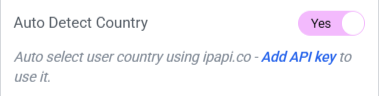
- To enable automatic country detection, you’ll need to add an API Key.
- Click on the “Add API Key” link provided under the Automatically Detect Country setting.
- You will get redirected to the WordPress Admin panel under Elementor >> Cool FormKit >> Settings Tab.
- Enter the API key in the input field and click on the “Save Changes” button.
By following these simple steps you’ve easily enabled Country Code in Elementor Form “Tel Field”.
Conclusion
A Country Code field for Elementor form may seem like a small addition, but it can significantly improve the accuracy of the contact information you collect and improve the user experience.
Cool FormKit makes it easy to add and customize a Country Code Field without any coding.
Additionally, if you’re looking to extend the capabilities of Elementor Forms even more, Cool FormKit includes several powerful features such as Conditional Logic, Calculator Fields, Input Mask, Rating Field, Range Slider, and more. All the features are designed to help you create advanced forms with ease.
FAQs
How to Add the country code for Elementor form telephone field?
Elementor built-in telephone field does not provide Country Code selector. You need to use an additional addon to set country code in Elementor like Cool FormKit. This addon extends the functionality of Elementor forms and provides country code dropdown and other customized features.
Can I display country flags with the country code dropdown?
Yes, Cool FormKit allows you to display country flags alongside country codes. This makes it easier for users to quickly identify and select their country. The visual flags along with country code improves the user experience and ensures accuracy.
How do you display a country code dropdown list in an Elementor form?
Elementor Form Widget does not provide a Country Code Dropdown by default. To add a Country Code dropdown in Elementor form you need an additional addon like Cool Formkit. By installing and activating the addon you can enable the country code feature. This will automatically add a country code dropdown alongside the telephone field in Elementor .
Is it possible to automatically detect a user’s country?
Yes, Cool Formkit provides an auto detect country option. It automatically detects the user’s country based on their IP address. This feature helps users fill out forms more quickly since they do not need to manually search for and select their country. To use this feature, you need to enable Auto Detect Country and provide a valid API key for the geolocation service used to identify the user’s location.
How to prevent users from entering invalid characters in the phone number field?
You can prevent the users from entering invalid characters by enabling Strict Mode in Cool Formkit. This feature restricts the phone number field to accept only numeric values and automatically removes invalid characters.
Does Elementor Pro include a country code dropdown by default?
No, Elementor Pro includes a Tel field for collecting phone numbers, but it does not provide a built-in country code dropdown or country selector.
What are Alpha-2 country codes?
Alpha-2 country codes are short two-letter codes used to represent countries. For example, IN stands for India, US stands for the United States, and GB stands for the United Kingdom. These codes are often used in forms, dropdowns, and website settings to identify countries.